
Working with Microsoft Fabric as your data platform but feel like something is missing in your lifecycle management? As your team grows, you quickly notice how much of the process still relies on manual steps. It’s not exactly user-friendly when it comes to developing new features collaboratively, deploying them across environments like test and production, or enforcing proper security boundaries. After all, if someone can deploy to your test environment, what’s stopping them from doing the same in production?
Feature workspaces
Modern data work is almost never a solo effort; teams develop new features in parallel all the time. In software development, this is a solved problem with Git feature branches: an isolated space off the main branch where developers can build new functionality or fix bugs without touching stable code. The goal is to bring that same way of working to Microsoft Fabric workspaces, but without endless ClickOps in the UI or having to constantly tweak the right workspace settings by hand.
Branch out to workspace
Microsoft Fabric already offers a feature that can create a new branch and synchronize its content to a separate feature workspace. The downside is that it still involves many manual steps, increasing the risk of errors along the way. On top of that, every developer would need capacity admin permissions to use it effectively, which is often not desirable from a governance and security perspective.

Automation using the Fabric CLI
Instead of relying on ClickOps, this blog walks through an automated approach. In this setup, the Fabric CLI is used, a file-system-inspired command-line interface built and maintained by Microsoft. It allows you to explore, automate, and script your Fabric environments rather than configuring everything by hand. The CLI supports many different operations, but in this section the focus is on a small set of commands that help create feature workspaces and configure their settings exactly the way your team needs.
The commands we use in our automation script are:
createto create the workspace itself.aclto manage the permissions and security settings of our new workspace.setto configure some specific workspace settings like its Spark settings.existsto check the existence of workspaces, so we do not do anything unnecessary .apito configure the git settings via the Microsoft Fabric’s REST APIs.
The addition of the api command in the CLI is especially useful, because it enables authenticated requests for more advanced operations that go beyond the built-in commands. All these commands can run from a Python script, authenticated via a service principal for secure, hands-off execution. You can then trigger that script directly in your Azure DevOps or GitHub Actions pipeline.

Next to automatically deploying via Azure DevOps or Github Actions configurable details like feature workspace naming conventions, access control lists, Git settings, and preferred Fabric capacity can be put into a single JSON file to keep your script clean, readable, and easy to extend.

One of the best perks of staying in a hotel is the housekeeping that takes care of everything for you. When you return, your room is perfectly tidy. You can achieve the same automated cleanup with feature workspaces: set up a pipeline that triggers on pull request completion and runs the Fabric CLI rm command to automatically delete the workspace(s) linked to that feature branch.
Fabric Tip
Configure Spark settings in your JSON file to limit maximum executors and nodes to 1, and you can cut Spark CU usage in half. By default, Spark pools use two nodes (8 CUs total), but this setting creates a single-node pool where the driver and executor share the same node, dropping usage to just 4 CUs. During development, the focus is on having compute available for testing rather than maximum speed, so this small tweak delivers big cost savings while letting you keep dev capacity leaner and reserve more compute for your data engineers.
Getting it ready for production
With new features now developed in their isolated feature workspaces and successfully merged into the dev workspace branch, the next step is deploying to the test environment for thorough validation before production release.
Fabric deployment pipelines with variable libraries
If you use Fabric or know Power BI, chances are you’re already using Fabric deployment pipelines to push items and reports to production workspaces. This feature originated in the Power BI days and has since expanded to cover the full Fabric data platform. While it’s convenient for non-technical users like analysts and business users, it falls short for data engineers treating Fabric as a complete data platform.
Fabric deployment pipelines lack support for pre- and post-deployment operations, plus the environment-specific customizability that data engineering workflows demand. Variable libraries can help with some customization, but they come with frustrations like reverting to default values in each environment when you add new ones, potentially breaking your data platform. As a low-code/no-code solution, it also offers bad traceability: if someone tweaks a deployment rule, good luck tracking down the original correct setting.
Deploy using fabric-cicd
If your team has technical expertise, step away from Fabric deployment pipelines for the engineering side of your data platform. Power BI report workspaces should still use deployment pipelines, where the technical skill level needs to stay as low as possible.
Just like the feature workspace automation, deployment runs through a Python script triggered in an Azure DevOps or GitHub Actions pipeline. The key library here is fabric-cicd, also built by Microsoft, which enables code-first CI/CD automations for source-controlled workspaces. It acts as a wrapper around the Fabric API to simplify the entire deployment process. The deployment process only utilizes three components from the library.
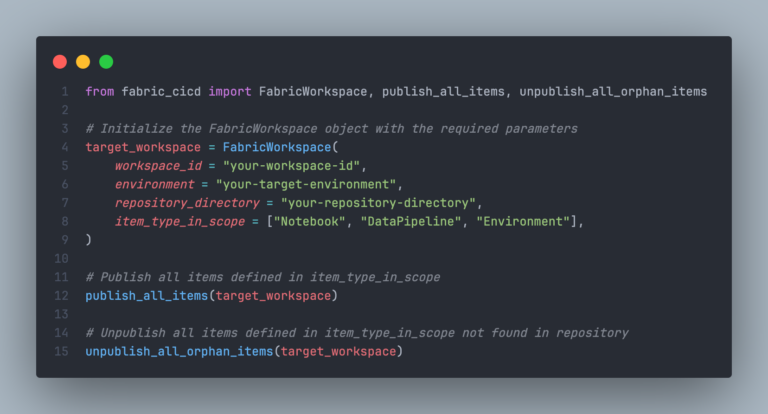
First, define your target workspace by its ID and the repository containing the Fabric items to deploy. Specify the item types to include and the target environment as a simple string (more on this later). Next, the publish_all_items() function handles the deployment of everything to your Fabric workspace. Optionally but recommended, have the script also delete any items in the workspace that no longer exist in the repository to keep things clean and tidy. This by utilizing the unpublish_all_orphan_items() function.
When you run this code, every item from your development workspace deploys to test or production. But what about pre- and post-operations or environment-specific tweaks? Parameterization handles that: the environment string you pass to the FabricWorkspace class triggers a find-and-replace operation using a YAML file. Drop a parameter.yml file in your repository directory, and the publish function automatically applies it during deployment for endless customization options. Here are some favorites:
- Switch notebooks to connect to the correct lakehouses in each environment (dev/test/prod).
- Update pipeline connections to point to the right data sources.
- Change your shortcuts connections in your lakehouses.
- Adjust environment-specific values in your pipelines.
- Enable or disable pipeline schedules as needed.
A nice bonus comes with Azure DevOps deployments: add approval logic so anyone can deploy to test, but only a select group can approve production changes. Plus, with everything tracked in Git, traceability becomes rock-solid.
Conclusion
Scaling Microsoft Fabric effectively means moving beyond the user interface and embracing automation. While ClickOps and standard deployment pipelines work for smaller teams or reporting scenarios, they often lack the rigor required for complex data engineering workflows. By adopting the Fabric CLI for feature branch management and fabric-cicd for production deployments, you transform your lifecycle management into a robust, code-first process.
Transitioning to this automated workflow requires some initial investment in Python scripts and CI/CD pipelines, but the return is a secure, traceable, and professional data platform that scales effortlessly with your team.