

In data engineering, teams often receive daily full snapshots of data from legacy systems or third-party sources. Traditionally, ingesting these periodic snapshots and identifying what changed (inserts, updates, deletes) each day has been cumbersome. Engineers need to write and maintain source-specific Change Data Capture (CDC) logic for each data source.
Databricks has introduced Lakeflow Spark Declarative Pipelines and the AUTO CDC FROM SNAPSHOT feature, which simplify this process. With a single function, teams can apply CDC across various data sources without custom logic for each one. This article explains how these pipelines work and how AUTO CDC FROM SNAPSHOT can streamline daily snapshot ingestion in a Databricks Lakehouse environment.
What is Lakeflow Spark Declarative Pipelines?
Lakeflow Spark Declarative Pipelines (SDP), previously known as Delta Live Tables, is a declarative framework for building data pipelines using SQL or Python. The declarative approach means defining the desired end results, such as target tables, without worrying about step-by-step execution.
It simplifies pipeline development by handling execution plans, scheduling, managing dependencies, retries, scaling, and data quality checks with built-in expectations. Teams can define rules to alert, drop, or halt the pipeline based on data quality issues. SDP supports both batch and streaming data with the same logic, enabling incremental updates without reprocessing everything.
Built on Apache Spark, it leverages familiar concepts like DataFrames and Structured Streaming while adding features that reduce boilerplate and improve maintainability.
The challenge of daily snapshot ingestion
If a source exposes native CDC, it should be used because the source itself shows what changed since the previous day. However, in many real-world setups CDC is not enabled on the source tables or direct database access is not possible, leaving daily snapshots as the only integration option.
In such cases, a source system provides a daily full snapshot of a database table (for example, a full dump of all customers each day). The challenge is ingesting these snapshots and keeping the target table up-to-date with only the changes since the previous day, rather than reloading everything.
Change Data Capture (CDC) is the standard approach for identifying and applying data changes, typically implemented through SQL MERGE statements.
But what if the platform could automatically detect changes between snapshots? This is where AUTO CDC FROM SNAPSHOT comes in.
Introducing AUTO CDC FROM SNAPSHOT
AUTO CDC FROM SNAPSHOT is a declarative pipeline feature that automatically detects changes between consecutive snapshots and applies them to a target table.
In simple terms, teams point this feature to a series of snapshots, and it compares the latest snapshot to the previous one to apply changes.
It supports SCD Type 1, which overwrites with the latest data (without history), and SCD Type 2, which preserves change history (with metadata like _START_AT and _END_AT). This provides fine-grained control, allowing one tool to support both current state analytics and full history requirements. Teams can also specify which columns should trigger a new version and which changes are irrelevant
AUTO CDC FROM SNAPSHOT is currently in Public Preview and available only via the PySpark pipelines API.
AUTO CDC FROM SNAPSHOT in practice
Setting up a pipeline to ingest daily snapshots with AUTO CDC FROM SNAPSHOT is straightforward.
Versioned snapshots
Snapshots should be stored and identifiable so they can be processed in order. Common patterns include date-based names likesnapshot_2025-11-20.csv, snapshot_2025-11-21.csv or versioned names like snapshot_1 , snapshot_2, etc.
Each snapshot must be distinct so the pipeline knows the processing order.
Define a target streaming table
To use AUTO CDC FROM SNAPSHOT, define the target streaming table upfront. The declaration specifies where the data will land and how it should be stored, but contains no execution logic yet.
					dp.create_streaming_table(
    target,
    comment=f" AUTO CDC FROM SNAPSHOT of {target}",
)
Attach the AUTO CDC FROM SNAPSHOT flow
Next, configure how snapshots should be compared and how changes should be applied with the create_auto_cdc_from_snapshot_flow function. The pipeline compares each new snapshot to the target table and automatically applies inserts, updates, and deletes.
					dp.create_auto_cdc_from_snapshot_flow(
    target=target, # streaming target table
    source=source, # snapshot source table or snapshot loader function
    keys=keys, # unique identifier columns
    stored_as_scd_type=scd_type # SCD type 1 or type 2
)
The snapshot source can be defined in two ways. If snapshots come from an existing table, pass the table name. Each time the pipeline runs, it reads the current contents of that table as the full snapshot.
If snapshots are provided as files, define a snapshot loader function. This function loads the next snapshot file into a DataFrame and returns it along with a version identifier.
What does a snapshot loader function look like?
The snapshot loader discovers available snapshots for a specific entity and returns them one by one to the pipeline. Its responsibility is deliberately narrow: given the last processed version, it determines the next snapshot and loads it as a DataFrame.
					from typing import Optional, Tuple
from pyspark.sql import DataFrame

def create_snapshot_loader(entity: str):
    base_path = f"/Volumes/raw/snapshots/{entity}"

    def next_snapshot_and_version(
        latest_snapshot_version: Optional[str]
    ) -> Optional[Tuple[DataFrame, str]]:

        versions = sorted(f.name.rstrip("/") for f in dbutils.fs.ls(base_path))

        if not versions:
            return None

        if latest_snapshot_version is None:
            next_version = versions[0]
        else:
            try:
                next_version = versions[versions.index(latest_snapshot_version) + 1]
            except (ValueError, IndexError):
                return None

        df = spark.read.parquet(f"{base_path}/{next_version}")
        return df, next_version

    return next_snapshot_and_version
When the pipeline runs for the first time, there is no latest_snapshot_version. The loader returns the first available snapshot and its version. The pipeline processes that snapshot and stores the returned version internally.
On subsequent runs, the pipeline calls the loader again and passes in the last processed version as latest_snapshot_version. The loader uses this value to determine which snapshot to load next and returns the new version. This continues until no newer snapshot is available, at which point the function returns None, indicating there is no more work to be done (or when the entity folder doesn’t contain any snapshot folders at all).
Putting it together in a reusable pattern
In practice, defining the streaming table and attaching AUTO CDC FROM SNAPSHOT can be wrapped into a function. This pattern simplifies onboarding new entities from the same source system. A single source often delivers daily snapshots for multiple entities such as customers, orders, and products. While the schema and keys differ per entity, the ingestion logic remains identical.
					def create_snapshot_cdc_flow(target: str, source_loader, keys: list, scd_type: int):
    """Define a streaming table and attach an AUTO CDC FROM SNAPSHOT flow."""
    dp.create_streaming_table(
        target,
        comment=f"SCD{scd_type} of {target}",
        table_properties={
            "delta.enableChangeDataFeed": "true"
        }
    )

    dp.create_auto_cdc_from_snapshot_flow(
        target=target,
        source=source_loader,
        keys=keys,
        stored_as_scd_type=scd_type
    )

# Example: set up CDC flows for multiple entities
create_snapshot_cdc_flow("customers_scd2", create_snapshot_loader("customers"), keys=["customer_id"], scd_type=2)
create_snapshot_cdc_flow("orders_scd1", create_snapshot_loader("orders"), keys=["order_id"], scd_type=1)
With this setup, adding new entities becomes configuration-driven. Simply vary the entity name, primary keys, and SCD type, and the ingestion logic stays consistent.
Running and observing the pipeline
Once deployed in Databricks, the pipeline can be run manually or scheduled. In production, it typically runs daily when new snapshots arrive, or continuously to automatically pick up new snapshots as they become available.
After each run, the target table reflects the latest state of the source data. New records are inserted, existing records are updated, and records that disappeared from the snapshot are removed or historized, depending on whether SCD type 1 or type 2 is used.
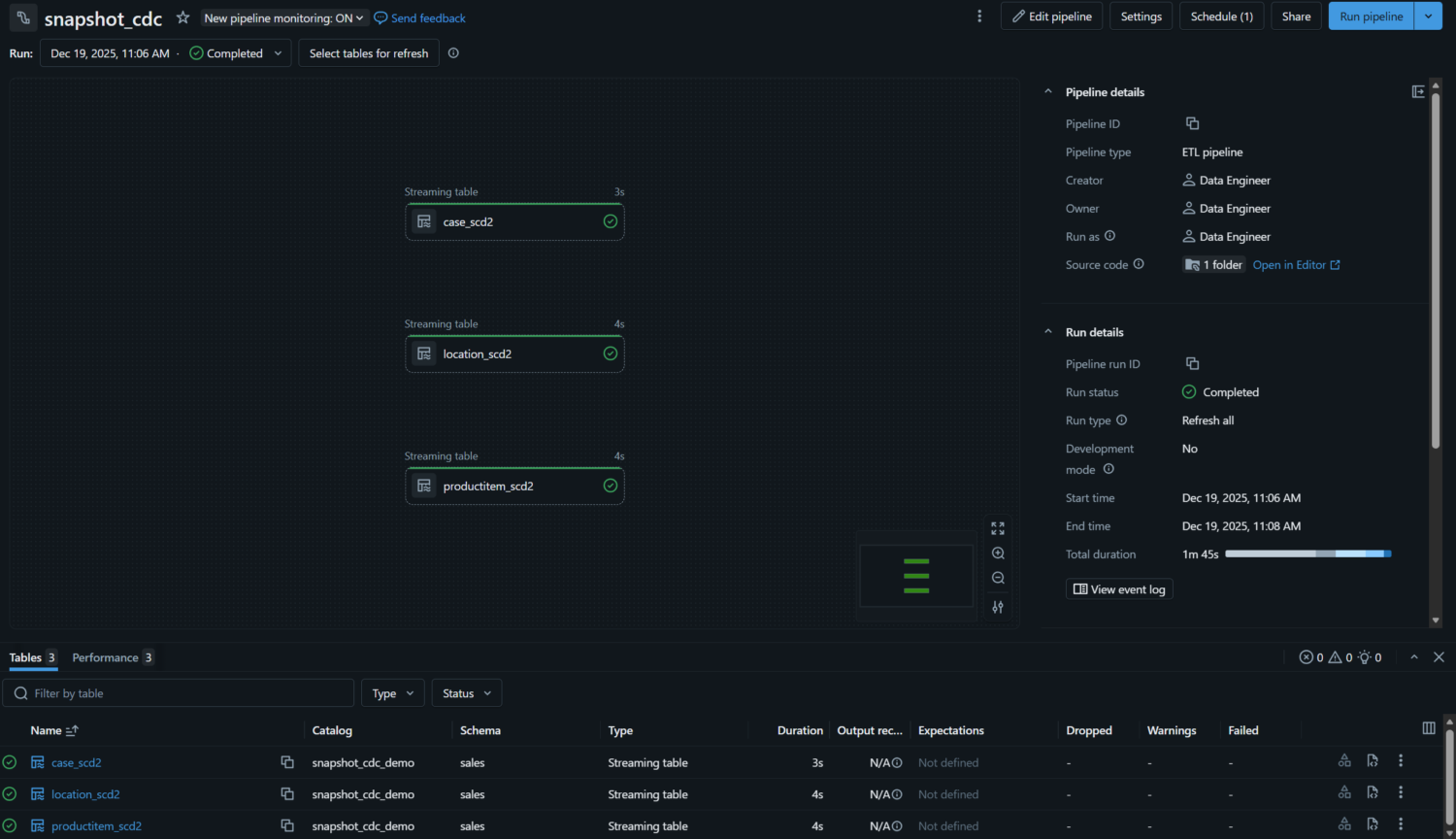
The pipeline monitoring page offers a clear overview of each run. Each table appears as a node in the DAG or as a row in list view, showing status, duration, and any errors at a glance. However, row-level metrics are not captured for AUTO CDC FROM SNAPSHOT flows, those are only available for AUTO CDC queries with change data feed enabled source data.
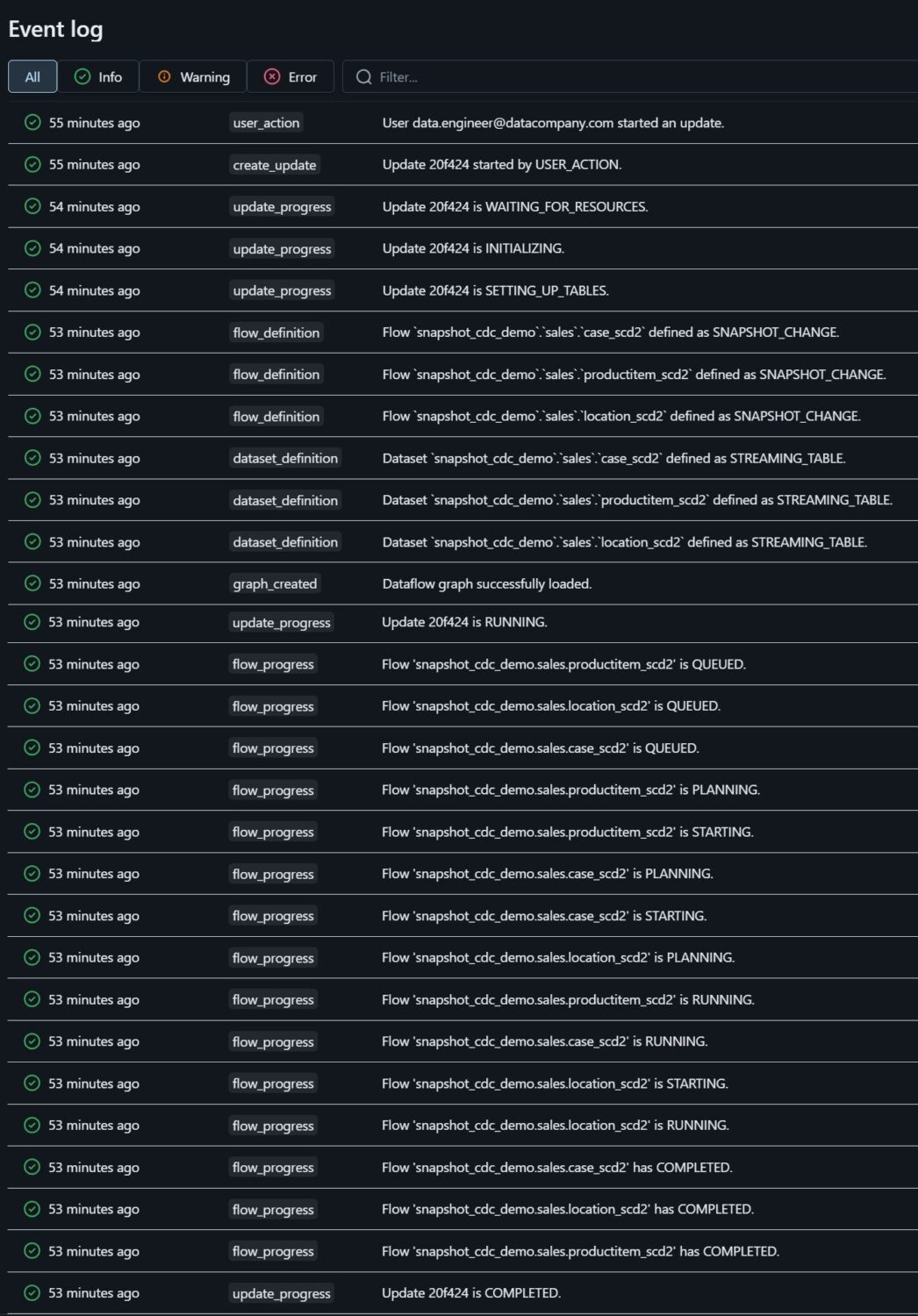
Each pipeline run exposes a structured event log in the UI. This log shows how the pipeline executed, providing transparency into what was processed and how the pipeline evolved, even when detailed metrics are limited. If needed, the same event information can also be persisted as a table to analyze pipeline behavior over a longer period.
Conclusion
Lakeflow Spark Declarative Pipelines and AUTO CDC FROM SNAPSHOT provide a modern solution to a common data engineering challenge: keeping tables accurate and up-to-date when source systems only provide periodic snapshots.
Instead of hand-crafting comparison logic, staging tables, and merge statements, teams can now declare the desired outcome and let the platform handle the complexity. Inserts, updates, deletes, and retries are applied automatically using a consistent execution model. This significantly reduces custom code and operational overhead while lowering the risk of subtle change-capture errors.
For engineering teams, this means pipelines that are easier to understand, maintain, and evolve. For the business, it results in faster data availability and higher trust in reporting and analytics, as tables reliably reflect the current state of the source data.
AUTO CDC FROM SNAPSHOT is particularly valuable in environments where event-level change feeds are unavailable, such as legacy systems, SaaS exports, or data warehouse extracts. Rather than treating this as a limitation, it turns periodic snapshots into reliable, query-ready tables, enabling analytical use cases that would otherwise require substantial engineering effort.
More broadly, this declarative approach illustrates how the modern data stack is evolving toward higher-level abstractions that reduce complexity while improving correctness and speed. For teams maintaining snapshot CDC logic or custom merge pipelines, AUTO CDC FROM SNAPSHOT offers a practical path to simpler, more robust data ingestion.
Sources:
Microsoft. (n.d.). The AUTO CDC APIs: Simplify change data capture with pipelines. Microsoft Learn.https://learn.microsoft.com/en-us/azure/databricks/ldp/cdc
Microsoft. (n.d.). Create auto_cdc_from_snapshot_flow – Azure Databricks. Microsoft Learn. https://learn.microsoft.com/en-us/azure/databricks/ldp/developer/ldp-python-ref-apply-changes-from-snapshot


